


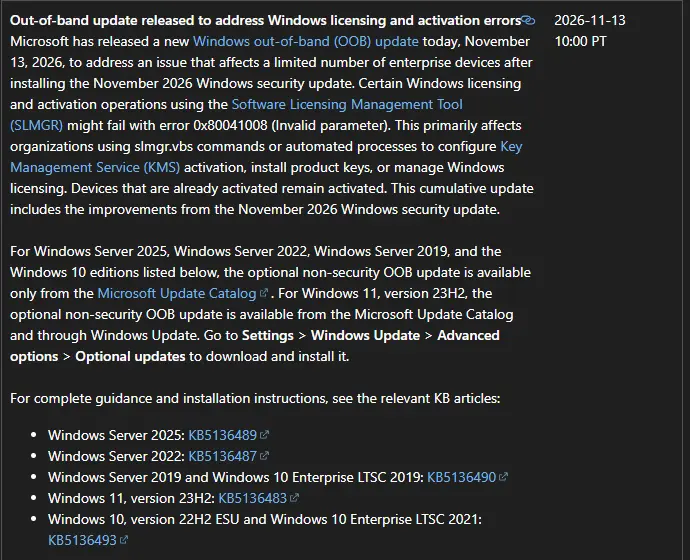
If slmgr.vbs fails with 0x80041008 and “Invalid parameter” after the November 2026 security update, install the out-of-band update for your Windows version. Microsoft released them on November 13, 2026. Most of them are only in the Microsoft Update Catalog, so Windows Update will not offer them on its own.
Status as of November 21, 2026: fixed by the out-of-band updates below. Devices that were already activated stayed activated.
Symptoms
After the November 10 update, slmgr commands that change licensing fail. On Server 2025, Microsoft names slmgr.vbs /skms-domain and slmgr.vbs /ipk, and the error text reads:
Error: 0x80041008 Invalid parameter (SWbemObjectEx)It hits scripts and task sequences that set a KMS host, install a product key or switch editions. A server that was activated before the update keeps working. So does a KMS client that needs no new slmgr commands. You only notice it when you build a new server, change a key or re-point KMS.
Which Update Fixes It
Find your version, then download that KB from the Microsoft Update Catalog. Each one is cumulative and includes the November security fixes.
Windows Server 2025: KB5136489, build 26100.33828.
Windows Server 2022: KB5136487.
Windows Server 2019 and Windows 10 Enterprise LTSC 2019: KB5136490.
Windows 10 22H2 with ESU and Windows 10 Enterprise LTSC 2021: KB5136493.
Windows 11 23H2: KB5136483. This is the only one also in Windows Update, under Settings, Windows Update, Advanced options, Optional updates.
Install the Fix on a Server
1. Check the servicing stack. On Server 2025, KB5136489 needs servicing stack 26100.33822 or later. From an elevated prompt:
DISM /Online /Get-Packages | findstr /i "ServicingStack"2. Download every file. The Catalog entry can list a checkpoint cumulative update as well as the target update. Put all the .msu files for the KB in one empty folder, such as C:\Packages.
3. Install with DISM. Point DISM at the target file and it installs any checkpoint update in that folder first:
DISM /Online /Add-Package /PackagePath:C:\Packages\windows11.0-kb5136489-x64_.msu4. Restart, then retry. Run the command that failed again. Confirm the result with:
cscript //nologo C:\Windows\System32\slmgr.vbs /dlvWSUS shops: out-of-band updates are not always offered through WSUS on their own. Import the KB from the Catalog into WSUS, or install it by hand on the servers you are building now and let next month’s cumulative update carry the fix to the rest.
If You Cannot Patch Yet
Microsoft has not published a workaround. Hold new KMS client builds and product key changes until the update is on the box. Do not uninstall the November security update to get slmgr working. That trades a licensing annoyance for missing security fixes, and the out-of-band update solves both.
Watch for the SQL Server Known Issue
The out-of-band updates carry the same open known issue as November’s security update: SQL Server linked server connections can stay open and pile up. If the server runs SQL Server with linked servers to Oracle or PostgreSQL, read our SQL Server linked server fix before you install.
What This Means for Your Business
Nothing stops working on PCs and servers that are already activated. The risk is a new server or a rebuilt PC that cannot activate, which then nags users and eventually limits features. If your IT person is setting up anything new this month, ask whether the out-of-band update went on first.
Related Posts
November 2026 Patch Tuesday Known Issues and Fixes
How to Reset the WSUS Client ID
How to Safely Uninstall a Bad Windows 11 Update
Need help with Windows activation or KMS? Contact Rain City Techworks.