

If the November 2026 Windows 11 update, KB5132061, keeps failing with 0x800f0993, 0x80070306 or 0x800f0989, you do not need to fix anything on the PC yet. Microsoft confirmed the bug and is sending a repair through Windows Update. Once a device gets the repair, it installs KB5132061 on its own.
Status as of November 15, 2026: the known issue is listed on the KB5132061 page with the repair still rolling out. Microsoft says it will update the page once the rollout is complete. It is not on the Windows 11 release health dashboard.
For owners: a PC that keeps asking to restart for the same update is probably this. It is safe to keep working. Leave the PC on and connected, and it should sort itself out.
Quick Fix
Keep the PC online and let Windows Update check in. Open Settings, go to Windows Update and click Check for updates. The repair arrives on its own, then KB5132061 downloads and installs. Restart when asked.
Confirm it worked from PowerShell. The build should end in .9974 and the hotfix should be listed:
Get-HotFix -Id KB5132061
(Get-ItemProperty 'HKLM:\SOFTWARE\Microsoft\Windows NT\CurrentVersion').CurrentBuild + '.' + (Get-ItemProperty 'HKLM:\SOFTWARE\Microsoft\Windows NT\CurrentVersion').UBR
KB5132061 brings 24H2 to build 26100.9974, 25H2 to 26200.9974 and 26H2 to 26300.9974.
What Microsoft Says
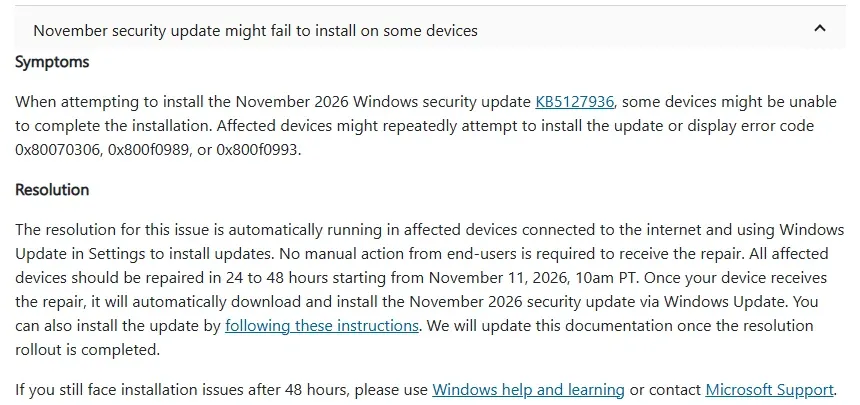
The symptom. Some devices cannot finish the install. They retry over and over, or show one of the three error codes. The KB text names KB5127936, which is the October preview update, but the entry sits on the KB5132061 page and describes the November security update. Treat it as a typo.
Who it hits. The KB lists the issue as applying to Windows 11 version 24H2, Enterprise and Education editions only. If a Pro or Home PC fails with the same codes, it may be a different problem, so read the logs before you assume.
The repair. Microsoft says the resolution runs automatically on affected devices that are connected to the internet and use Windows Update in Settings. No action is needed from users. Microsoft set the rollout window at 24 to 48 hours from November 11 at 10am Pacific. If a device still fails after that, Microsoft points you to Windows help or Microsoft Support.
Managed With WSUS, Intune or ConfigMgr
This is where it gets awkward. Microsoft only promises the repair to devices that update through Windows Update in Settings. A PC that gets updates from WSUS or Configuration Manager may never receive it, and Microsoft has not said otherwise.
Check the prerequisites first. For 24H2 and 25H2, the device needs an update from June 10, 2025 or later, such as KB5060842, and servicing stack 26100.4193 or later. For 26H2, it needs an update from September 22, 2026 or later, such as KB5124010, and servicing stack 26100.9539 or later. Check the servicing stack with the command from Microsoft’s KB:
DISM /Online /Get-Packages | findstr /i "ServicingStack"Try the standalone package. Download KB5132061 from the Microsoft Update Catalog and install it with Microsoft’s install instructions. If the same error comes back, the device needs the repair, and the clean route is to let one test machine scan Windows Update directly and see if it clears.
Intune with Windows Update for Business. These devices talk to Windows Update directly, so the repair should reach them like any unmanaged PC. Look at the update ring report rather than forcing a reinstall.
Read the Logs Before Changing Anything
If a device is still failing after the rollout window, pull the logs so you know which error you have. These two cover most cases:
Get-WindowsUpdateLog -LogPath "$env:USERPROFILE\Desktop\WindowsUpdate.log"
Select-String -Path C:\Windows\Logs\CBS\CBS.log -Pattern "0x800f0993|0x80070306|0x800f0989" | Select-Object -Last 20
About the Windows Sandbox advice. Some sites report that turning off the Windows Sandbox feature lets the update install. Microsoft has not confirmed that, and it is not in the KB. We would not remove Windows features, or turn off Memory Integrity, to get around a bug Microsoft is already repairing.
Do not run reset scripts on every machine. Clearing SoftwareDistribution or running DISM repairs will not speed up a server-side fix. Keep them for devices that still fail once the repair has had time to land.
References
Microsoft Support: November 10, 2026, KB5132061
Microsoft Learn: Windows 11, version 24H2 known issues
Related Posts
Fix 0x80070643 Windows Update Installation Failure
How to Safely Uninstall a Bad Windows 11 Update
Need help getting updates through on a managed fleet? Contact Rain City Techworks.