

Microsoft released the November 2026 updates on November 10: KB5132061 for Windows 11 24H2, 25H2 and 26H2, and KB5131080 for Windows Server 2025. A Server 2025 out-of-band update, KB5136489, followed on November 13. Patch Tuesday is the second Tuesday of each month, when Microsoft ships its regular security fixes.
Status as of November 15, 2026: one confirmed issue is still open, one is mid-repair and one is resolved by an out-of-band update. Open items come first below, then what November fixed.
For owners: if a printer would not add, USB headsets went silent or Remote Desktop acted up after October’s updates, November fixes those. The one item to push your IT person on is the Outlook security fix, which needs an Office update.
Still Open: SQL Server Linked Server Connections Stay Open
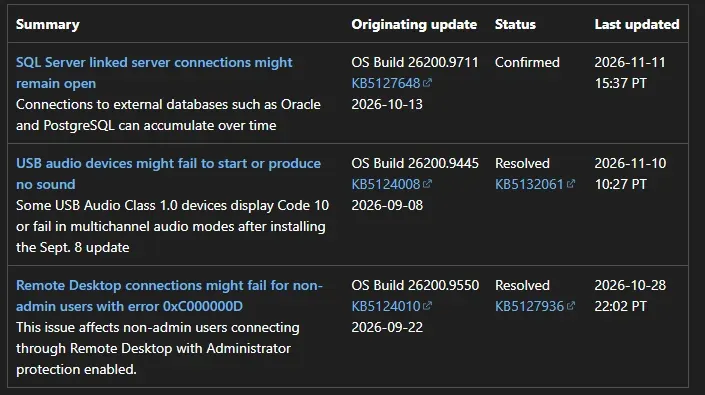
Status: Confirmed. After the October 13 update, KB5127648, or later, SQL Server linked server queries that use OLE DB providers can leave their connections open after the query finishes. Connections to Oracle and PostgreSQL are known to be affected. They pile up and slow the server down over time.
Microsoft’s temporary relief is to close idle connections or restart the SQL Server service, both of which can interrupt running queries. A mitigation is available through Microsoft Support for business, and Microsoft says an out-of-band fix is coming. Server 2012 through 2025 are on the affected list. On the SQL Server host, count established connections per remote address and run it again later. A count that only ever climbs is the sign:
Get-NetTCPConnection -OwningProcess (Get-Process sqlservr).Id -State Established |
  Group-Object RemoteAddress, RemotePort | Sort-Object Count -Descending | Select-Object Count, Name -First 10
Mid-Repair: KB5132061 Fails With 0x800f0993
Some PCs cannot install KB5132061 and retry over and over, or fail with 0x800f0993, 0x80070306 or 0x800f0989. Microsoft lists it for Windows 11 24H2 Enterprise and Education and is pushing a repair through Windows Update in Settings. Devices on WSUS or Configuration Manager may not get it on their own. Full steps, including the managed-device route, are in our KB5132061 install error fix.
Resolved: slmgr Error 0x80041008 on Server 2025
After KB5131080, slmgr.vbs /skms-domain and slmgr.vbs /ipk could fail with 0x80041008, Invalid parameter (SWbemObjectEx). Servers that were already activated stayed activated. The November 13 out-of-band update, KB5136489, fixes it. Install it before you build new KMS clients or change product keys.
Needs an Office Update: Outlook CVE-2026-124194
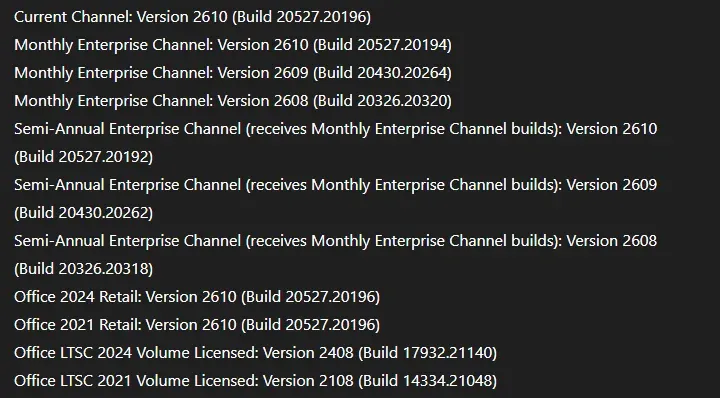
This one is a security fix, not a bug. CVE-2026-124194 is an Outlook flaw that attackers are already using. Opening a crafted message file can leak the user’s NTLMv2 hash. The patch comes through the Office update, not the Windows one, so check the Office build on every PC. Current Channel needs Version 2610, Build 20527.20196 or later. Every channel’s fixed build is in our CVE-2026-124194 advisory.
Changed on Purpose: Signed PowerShell Scripts
November adds stricter encoding checks for signed PowerShell scripts. Scripts with invalid UTF-8 can report NotSigned even though they carry a signature. Microsoft’s KB5135999 has a scan tool, and our signed script NotSigned fix walks through the convert and re-sign steps. This applies to Windows Server 2016 and later too.
Changed on Purpose: NTLM Signing
Windows clients now offer NTLM message signing by default. Servers still accept unsigned clients, so nothing should break yet. That changes in May 2027, when Microsoft plans for servers to require signing. Start auditing now with Event IDs 4022 and 4023 in the Microsoft-Windows-NTLM/Operational log. Details are in KB5135557.
Ongoing: WSUS Hides Sync Error Details
Still true since KB5070881: WSUS does not show synchronization error details. Microsoft removed the feature to close CVE-2025-59287. Plan on reading the WSUS logs on the server when a sync fails.
Fixed in November
USB audio Code 10. USB Audio Class 1.0 headsets and speakers that showed Code 10 or no sound after the September update work again with KB5132061. HDMI and DisplayPort audio on some AMD graphics cards is fixed too.
Printer error 87. Adding a printer published in Active Directory through Settings failed with error 87, “The parameter is incorrect.” after October’s update. Fixed. Existing printers were not affected. If printing itself fails with 0x00000709, that is a different problem, covered in our printer error 0x00000709 fix.
Remote Desktop. RDP connections that failed on the client with a certificate mismatch after the October preview update are fixed. On 24H2, KB5132061 also resolves the RDP 0xC000000D error for non-admin users with Administrator protection on.
On-premises Exchange. KB5131080 for Server 2025 fixes the issue that blocked OWA sign-ins, left mail in the Outlook Outbox and stopped mailbox replication. If you applied the EpmapSavedContextCap registry workaround from our MapiExceptionMdbOffline post, check the November notes for your Server version before you remove it.
References
Microsoft Support: KB5132061 for Windows 11
Microsoft Support: KB5131080 for Windows Server 2025
Microsoft Learn: Windows 11, version 25H2 known issues
MSRC: November 2026 Security Updates
Related Posts
October 2026 Patch Tuesday Known Issues
How to Safely Uninstall a Bad Windows 11 Update
Need help getting November’s updates out cleanly? Contact Rain City Techworks.