


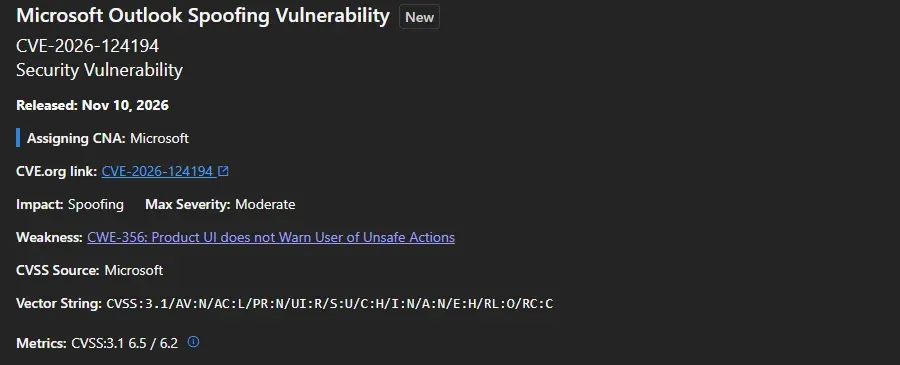
| CVE ID | CVE-2026-124194 |
| Full Title | Microsoft Outlook Spoofing Vulnerability |
| Severity | Moderate |
| CVSS Score | 6.5 / 10 (MEDIUM) |
| Impact | Spoofing, NTLMv2 hash disclosure |
| Attack Vector | Network |
| Attack Complexity | Low |
| Privileges Required | None |
| User Interaction | Required |
| Exploited in Wild | Yes |
| Public PoC | No |
| MSRC Assessment | Exploitation Detected |
| Patched | November 10, 2026 (Patch Tuesday) |
| NVD Entry | CVE-2026-124194 |
Affected Versions and Patches
| Office version | Fixed build or later |
|---|---|
| Microsoft 365 Apps, Current Channel | Version 2610, Build 20527.20196 |
| Microsoft 365 Apps, Monthly Enterprise Channel | 2610: 20527.20194, 2609: 20430.20264, 2608: 20326.20320 |
| Microsoft 365 Apps, Semi-Annual Enterprise Channel | 2610: 20527.20192, 2609: 20430.20262, 2608: 20326.20318 |
| Office 2024 and Office 2021 Retail | Version 2610, Build 20527.20196 |
| Office LTSC 2024 Volume Licensed | Version 2408, Build 17932.21140 |
| Office LTSC 2021 Volume Licensed | Version 2108, Build 14334.21048 |
The fix ships in Office, through Click-to-Run, not in the Windows cumulative update. Microsoft lists Microsoft 365 Apps for Enterprise, Office LTSC 2024 and Office LTSC 2021 as affected. Check Microsoft’s Office security release notes for builds released after this post.
What This Means for Your Business
If someone on your team opens one booby-trapped email file in Outlook, the attacker can get a scrambled copy of that person’s Windows password and use it to sign in as them. Installing Windows updates does not close this hole. Office has to update too, and on many office PCs it lags behind Windows or is switched to a slow update channel.
What Is Happening
Microsoft marks CVE-2026-124194 as exploited, and CISA added it to the Known Exploited Vulnerabilities catalog with a fix-by date of November 24, 2026 for federal agencies. That date is a sensible target for everyone else.
The severity label is only Moderate, which is why it is easy to skip. Do not. An attacker who gets the NTLMv2 hash can try to crack it offline or relay it to other services, and that is a common first step toward a wider breach.
How the Attack Works
The attacker sends a specially crafted message file and gets the user to open it in Outlook. Opening it makes Outlook connect to a server the attacker controls without showing the usual external-content warning. During that connection, Windows hands over the user’s NTLMv2 hash.
The Preview Pane is not an attack vector. Microsoft says the user has to open the file. Turning off the Preview Pane does not help, and leaving it on does not make this worse.
Do not mix it up with the other Outlook CVEs. The same release fixed other Outlook bugs, including CVE-2026-110043 and CVE-2026-111309. They are separate issues. The same Office update covers all of them.
Fix Steps
1. Check the build on one PC. In Outlook, go to File, Office Account, About Outlook. Or read it from the registry:
(Get-ItemProperty "HKLM:\SOFTWARE\Microsoft\Office\ClickToRun\Configuration").VersionToReport2. Update Office now. In any Office app, go to File, Office Account, Update Options, Update Now. Close Outlook when it asks, then check the build again against the table above.
3. Check the whole fleet. In the Microsoft 365 Apps admin center, the inventory view lists the build on each device. In Intune or Configuration Manager, report on the same registry value. Any PC below the fixed build for its channel is exposed.
4. Find the slow channels. Semi-Annual Enterprise Channel only gets new features twice a year, but it still gets security builds monthly. Check that the update deadline in your policy is not holding the November build back.
Mitigation While You Patch
Microsoft has not published a workaround for this CVE. Its general SMB guidance does help: block TCP port 445 outbound to the internet at your corporate firewall. That stops a PC from sending NTLM over SMB to a server on the internet. Do it on the perimeter firewall, not as a blanket Windows Firewall rule, or you break internal file shares and printers.
Microsoft does not say which protocol the attacker’s server uses, so the firewall rule reduces risk but does not replace the update.
Test it from a PC on the network. The result should be a failed connection:
Test-NetConnection -ComputerName portquiz.net -Port 445Remote staff off the VPN do not sit behind your firewall, so updating Office on their laptops comes first.
Signs of Exploitation
Look for Outlook making outbound connections to public addresses on port 445. In Microsoft Defender for Endpoint advanced hunting:
DeviceNetworkEvents
| where Timestamp > ago(30d)
| where InitiatingProcessFileName =~ "outlook.exe"
| where RemotePort == 445 and RemoteIPType == "Public"
| project Timestamp, DeviceName, InitiatingProcessAccountName, RemoteIP, RemoteUrl
Without Defender, check the perimeter firewall logs for outbound TCP 445 from workstations. Any hit is worth chasing. If you find one, reset that user’s password and review their recent sign-ins.
Ask Your IT Person
Is Office updating on every PC, separately from Windows? Get a yes with a report behind it, not a guess.
Is outbound port 445 blocked at our firewall? It is one rule, and it shuts down a whole class of these attacks.
Would we notice if a password hash leaked? Multi-factor sign-in on every account limits what a stolen hash can do in Microsoft 365.
Related Posts
Wi-Fi or VPN Won’t Connect After KB5127648: MS-CHAPv2 Fix
October 2026 Patch Tuesday Known Issues
Classic Outlook Retirement: The Real Timeline
If your organization needs help patching or assessing exposure across managed devices, reach out to our team.