


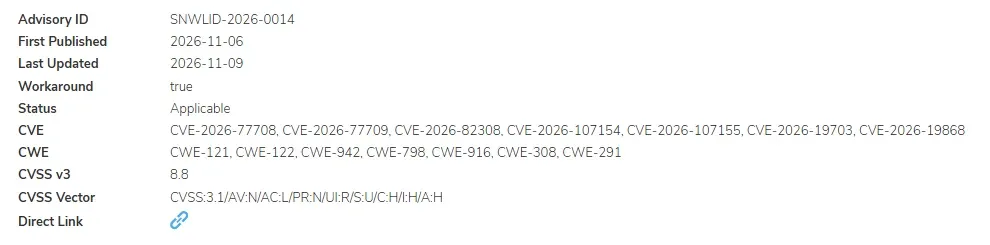
| CVE ID | CVE-2026-19868 |
| Advisory | SNWLID-2026-0014 |
| Full Title | SSLVPN Authentication Enforcement Vulnerability via Alternate Authentication Methods |
| Weakness | Use of single-factor authentication, CWE-308 |
| CVSS Score | 7.1 / 10 from SonicWall |
| Affected Only If | SAML is enabled for SSLVPN logins |
| Affected | Gen7 SonicOS 7.3.3-7015 and older, Gen8 SonicOS 8.2.2-8015 and older |
| Fixed In | Gen7 7.3.4-7015, Gen8 8.2.3 |
| CISA KEV | Added November 6, 2026, federal due date November 20, 2026 |
Affected Versions and Patches
Gen7 firewalls running SonicOS 7.3.3-7015 or older need 7.3.4-7015. Gen8 firewalls running 8.2.2-8015 or older need 8.2.3. The flaw only matters if SAML is turned on for SSLVPN logins. Check the SonicWall advisory SNWLID-2026-0014 for later changes. SonicWall revised its workaround section on November 9.
What This Means for Your Business
Many offices put SAML sign-in on their SonicWall VPN so remote staff have to pass Microsoft Entra or another identity provider, MFA included. This flaw lets someone with a working password for another sign-in method skip that step. Stolen passwords are cheap, which is why MFA was there. If your staff connect to the office through a SonicWall VPN, ask whether the firewall is on the fixed firmware.
What Is Happening
SonicOS can accept more than one way to sign in to SSLVPN. When SAML is enabled, it is supposed to be the gate. The flaw lets a user with valid credentials for an alternate authentication method get past the SAML controls, and with them any MFA enforced through SAML.
SonicWall says it investigated a report of potential exploitation. CISA added the CVE to its Known Exploited Vulnerabilities catalog on November 6. The advisory, SNWLID-2026-0014, covers seven CVEs in all, so the firmware update fixes more than this one.
Fix Steps
1. Check whether SAML is on for SSLVPN. If your SSLVPN does not use SAML sign-in, this CVE does not apply, though the other fixes in the same advisory still make the update worth doing.
2. Check the firmware version. The SonicOS management interface shows the running firmware on its dashboard. Compare it with the versions above.
3. Back up the configuration. Export the settings file before you upgrade.
4. Upgrade. Download 7.3.4-7015 for Gen7 or 8.2.3 for Gen8 from MySonicWall and install it in a maintenance window. The firewall restarts, so remote users drop off.
5. Confirm. Check the firmware version again after the restart.
Until You Patch
SonicWall’s workaround, revised November 9: if SAML is in use and you cannot upgrade yet, disable or delete every active LDAP, RADIUS and TACACS+ authentication server on the firewall. Those are the alternate sign-in paths the flaw abuses. In SonicOS they live under Device, Users, Settings, Authentication:
RADIUS: Configure RADIUS, then Settings, then RADIUS Servers. Disable or delete active servers.
LDAP: Configure LDAP, then Settings, then LDAP Servers. Disable or delete active servers.
TACACS+: Configure TACACS+, then Settings, then TACACS+ Servers. Disable or delete active servers.
Check first whether anything else on the firewall depends on those servers, such as admin sign-in. Limiting SSLVPN to the countries your staff connect from also cuts exposure while you schedule the upgrade.
Check for Suspicious Sign-Ins
Review SSLVPN sign-in logs since early November. Look for successful VPN logins with no matching sign-in in your identity provider’s logs, logins from unusual countries, and logins at odd hours for accounts that rarely use the VPN. A VPN session with no SAML sign-in behind it is the pattern this flaw would leave.
Ask Your IT Person
Does our SonicWall VPN use SAML sign-in? If yes, this one applies.
What firmware is the firewall on? Gen7 should be 7.3.4-7015 or later, Gen8 should be 8.2.3 or later.
Did anyone compare VPN logins against our identity provider? That is how you spot a login that skipped MFA.
Related Posts
Check Point CVE-2026-123039: Gaia Root Flaw Exploited
Cisco Expressway CVE-2026-76466: Patch to X15.5.20
vCenter CVE-2026-123890: Patch the 9.8 Auth Bypass
Need help updating your SonicWall or reviewing VPN access? Contact Rain City Techworks.