


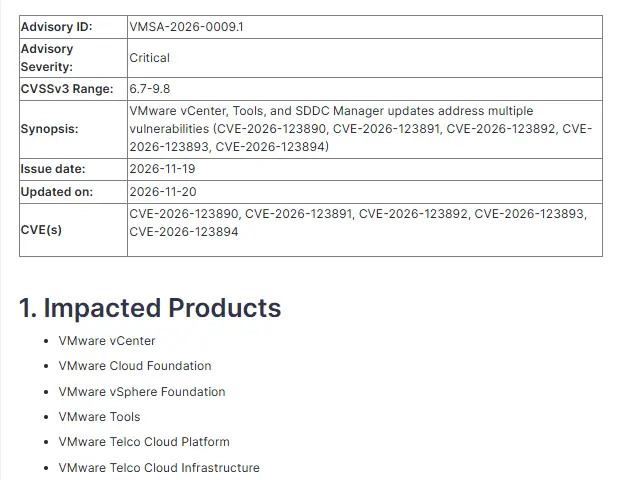
| CVE ID | CVE-2026-123890 |
| Advisory | VMSA-2026-0009 |
| Full Title | vCenter authentication-bypass vulnerability |
| Component | VMware Directory Service in vCenter |
| Severity | Critical |
| CVSS Score | 9.8 / 10 |
| Attack Vector | Network access to vCenter |
| Workarounds | None |
| Exploited in Wild | Not reported by Broadcom as of November 21, 2026 |
| Patched | November 19, 2026 |
| Reported By | Mandiant |
Affected Versions and Patches
| Product | Fixed version |
|---|---|
| vCenter 8.0 | 8.0 Update 3m, ISO build 25934264 |
| vCenter 9.0.x in VCF or VVF | 9.0.2.0200 |
| vCenter 9.1.x in VCF or VVF | 9.1.1.0200 |
| VMware Cloud Foundation 5.x | 5.2.5, see Broadcom KB88287 |
| vCenter 7.0 | Contact Broadcom Support if you have an extended support contract |
| Telco Cloud Platform and Infrastructure | Broadcom KB463116 |
Broadcom lists no workaround, so the update is the fix. vCenter 7.0 is past general support and gets a patch only through an extended support contract. Check the VMSA-2026-0009 advisory for later changes. It was already revised once, on November 20.
What This Means for Your Business
vCenter is the control panel for every virtual server you run on VMware. Anyone who can reach it over the network could get in without a password and then shut down, copy or encrypt your servers. Ransomware crews go after vCenter for exactly that reason. If your servers run on VMware, this is the patch to ask about this week.
What Is Happening
The flaw is in the VMware Directory Service, the part of vCenter that handles sign-in. Broadcom says a malicious actor with network access to vCenter may bypass authentication and gain unauthorized access. Mandiant reported it privately. Broadcom has not said it is being exploited, but a public advisory for a 9.8 bug tends to bring attackers quickly.
The same advisory fixes three SDDC Manager flaws in VMware Cloud Foundation and a VMware Tools bug. They are covered below.
Fix Steps
1. Find your version. In the vSphere Client, open the Help menu and choose About VMware vSphere. Or, from an SSH session on the vCenter appliance:
vpxd -v2. Take a snapshot and a backup. Take a file-based backup from the appliance management page on port 5480, and an offline snapshot of the vCenter VM. Patching vCenter is safe in most cases. A failed patch with no snapshot is a long night.
3. Patch. For vCenter 8.0, sign in to the appliance management page at https://your-vcenter:5480, open Update, check for updates and stage and install 8.0 Update 3m. If the appliance cannot reach the internet, download the patch ISO from the Broadcom support portal, attach it to the vCenter VM and check the CD-ROM for updates. VCF customers patch through SDDC Manager to 9.0.2.0200 or 9.1.1.0200.
4. Confirm. Run the version check again and make sure the build is 25934264 or later for 8.0 U3m.
Limit Exposure Until You Patch
Since the attack needs network access to vCenter, shrink who has it. vCenter should never face the internet. Put it on a management network that only admin workstations or a jump host can reach, and block it from the user network at the firewall. Test from an ordinary staff PC. It should not connect:
Test-NetConnection -ComputerName vcenter.yourdomain.local -Port 443Then review vCenter sign-ins and recent changes. Look for new local accounts, new roles or permissions and VMs powered off or deleted outside your change windows. Broadcom has not published indicators of compromise for this CVE, so treat anything unexplained as worth chasing.
The Other Fixes in VMSA-2026-0009
SDDC Manager: CVE-2026-123891 is SQL injection, CVE-2026-123892 is authenticated command injection and CVE-2026-123893 is local privilege escalation. All three are fixed in VMware Cloud Foundation 9.1.1.0200, which includes the earlier fixes.
VMware Tools for Windows: CVE-2026-123894, rated Moderate at 6.7, is a SAML token signature bypass. Someone who already has a privileged process inside a Windows VM configured with Guest Alias mapping can raise their rights in that VM. Update to VMware Tools 13.1.5.0, or 12.5.5 on the 12.x line.
Ask Your IT Person
Which vCenter version are we on, and is it 8.0 Update 3m or later? Get the build number, not “it’s up to date.”
Can a normal office PC reach vCenter? The answer should be no.
Are we still on vCenter 7.0? If so, there is no public patch, and moving off it, whether to 8.0 or another platform, is now urgent.
Related Posts
Proxmox vs ESXi vs Hyper-V: 2026 Showdown
Outlook CVE-2026-124194: Windows Update Won’t Fix It
November 2026 Patch Tuesday Known Issues and Fixes
If your organization needs help patching vCenter or locking down management access, reach out to our team.