


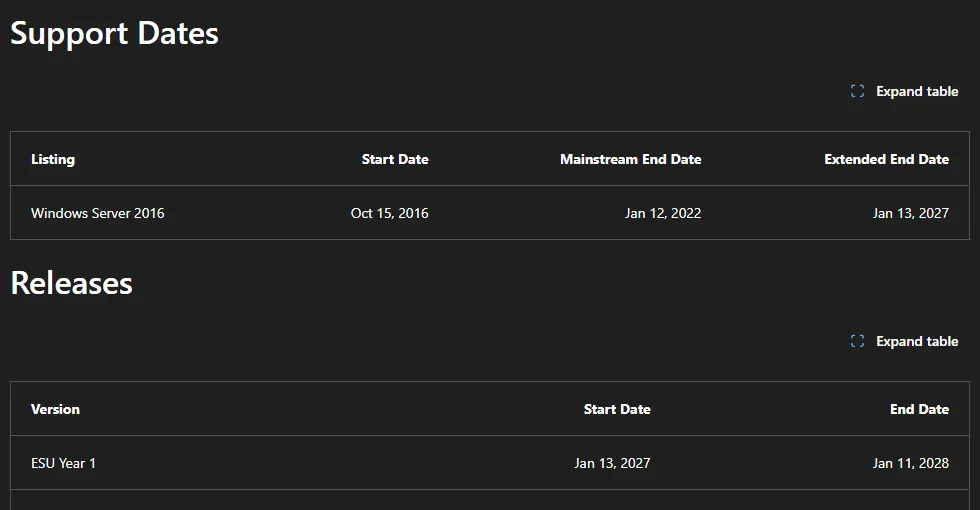
Windows Server 2016 gets its last free security update on January 12, 2027, the January Patch Tuesday. After that, a 2016 server only receives security fixes if you pay for Extended Security Updates.
Microsoft’s lifecycle page lists the extended end date as January 13, 2027, the day after that final update, and ESU year one starts the same day. Either way, the January 12 update is the last one.
That covers every edition: Standard, Datacenter, Essentials and MultiPoint Premium. Essentials-only features such as Remote Web Access lose support on the same date, and ESU is only offered for Standard and Datacenter.
What Happens After January 12
Nothing switches off on that date. The server keeps booting and running its roles. It just stops getting fixes, so every Windows vulnerability found after January stays open on it. Vendors also drop support for their apps on unsupported Windows, and cyber insurance questionnaires routinely ask whether you run any unsupported operating systems.
Find Every 2016 Server
Start with a list. Forgotten servers are the ones that get breached. On a domain, this lists every computer account reporting Windows Server 2016:
Get-ADComputer -Filter 'OperatingSystem -like "*Server 2016*"' -Properties OperatingSystem, LastLogonDate |
  Sort-Object LastLogonDate | Select-Object Name, OperatingSystem, LastLogonDate
Check the result against what is actually running. A stale computer account is not a live server, and a workgroup server, appliance or cloud VM will not appear at all. Note what each server does, since that decides which option below fits.
Option 1: Upgrade in Place to Server 2025
Microsoft supports an in-place upgrade from Windows Server 2016 straight to Windows Server 2019, 2022 or 2025. See the upgrade paths on Microsoft Learn. Going to 2025 gets you the longest runway. Before you start:
Back up and test the restore. An in-place upgrade that fails halfway needs a way back.
Check the apps. Confirm each vendor supports the new version, especially line-of-business apps, backup agents and antivirus.
Mind the domain controllers. Most admins add new 2025 domain controllers and retire the old ones instead of upgrading a DC in place. If your 2016 DCs have long hostnames, read our post on Server 2016 DC lookups failing on 15-character names first.
Licenses: a Server 2025 license and the CALs to go with it are needed for each upgraded server.
Option 2: Migrate the Role and Retire the Server
Often the cleaner move is a new server for the job, then shutting off the old one. File shares can move to a new server or to SharePoint and OneDrive. Print servers move to a new box or to cloud printing. An old app server may be a sign the app itself needs replacing. If you are rethinking the hypervisor at the same time, our Proxmox, ESXi and Hyper-V comparison covers the trade-offs.
Option 3: Buy Extended Security Updates
ESU buys time for servers you cannot move by January. It provides Critical and Important security updates for up to three years, through January 2030, and nothing else: no new features and no non-security fixes.
For on-premises servers, ESU is sold through Azure Arc and billed monthly, starting January 13, 2027. You need Software Assurance through a volume licensing program such as an Enterprise Agreement or Open Value, or licensing through SPLA or a Server Subscription. The steps:
1. Connect the server to Azure Arc with the Azure Connected Machine agent, version 1.62 or later.
2. Create the license. In the Azure portal, open Azure Arc, go to Licenses and create a Windows Server 2016 ESU license with the edition and core count.
3. Link the servers. On the Eligible resources tab, pick the servers, choose Enable ESUs and select the license.
4. Confirm on the server. The Extended Security Updates section should show Active:
azcmagent showUpdates still arrive through Windows Update, WSUS or your patch tool, so keep those working. If WSUS gives you trouble along the way, see our WSUS client ID reset.
What This Means for Your Business
If a server in the closet was bought around 2017, it is probably running 2016. Ask your IT person three things: how many 2016 servers you have, which option each one is getting, and what the plan is if January arrives first. ESU is a bridge you pay for each month, not a destination.
Related Posts
Server 2016 DC Lookup Fails on 15-Char Hostnames
Proxmox vs ESXi vs Hyper-V: 2026 Showdown
November 2026 Patch Tuesday Known Issues and Fixes
Need a plan for your Server 2016 machines? Contact Rain City Techworks.