Fix: Teams Meeting Add-in Keeps Disabling in Outlook
Outlook disables the Teams Meeting add-in every few days because it loads too slowly. Here's the permanent registry fix to stop the cycle.


Windows OS troubleshooting, updates, and fix guides
Outlook disables the Teams Meeting add-in every few days because it loads too slowly. Here's the permanent registry fix to stop the cycle.
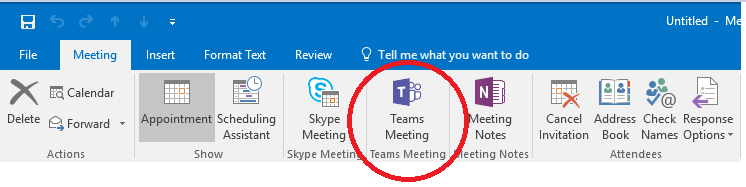
The Teams Meeting button vanished from your Outlook ribbon after a Teams update. The COM add-in registration is stale. Here's the fix.
Fix the 0xc0000005 crash in Classic Outlook caused by the Teams Meeting Add-in version conflict (Microsoft incident EX1254044).
Windows Sandbox hangs then fails with 0x800705b4? Four tested fixes for Windows 11 25H2 and 26H1.
Stop QuickBooks multi-user outages with proper LAN setup, firewall rules, and Database Server Manager config. IT guide for Seattle-Tacoma businesses.
Fix Windows Update errors 0x80070002, 0x800f081f, and 0x80240034 with cache resets, DISM repairs, and a PowerShell script.
Microsoft 365 desktop apps won't open or crash on startup? Fix Word, Excel, and PowerPoint with repair, safe mode, and update steps.
CVE-2026-20817 lets attackers escalate to SYSTEM via Windows Error Reporting. Patch now, check exposure, and lock it down.
Fix the Windows 11 KB5077181 boot loop, DHCP failure, and login errors. Uninstall steps for desktop and WinRE recovery.
Task Manager shows 10 startup items. Autoruns reveals 150+. Find hidden services, drivers, and scheduled tasks slowing your PC.
Fix Intune error 65000 when Settings Catalog policies fail. Troubleshoot ADMX ingestion and Windows 11 25H2 deployment issues.
Fix Windows Update and Microsoft Store timeout errors after the February 2026 Azure outage. Reset components and clear cache.