

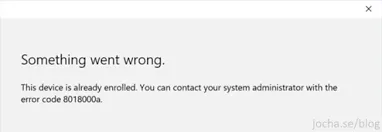
You're trying to enroll a device in Intune or Azure AD and get "Something went wrong. The device is already enrolled. Error code 8018000a." This happens when the device was removed from Intune but leftover enrollment records still exist in the registry.
The Fix
First, confirm the device isn't actually enrolled:
dsregcmd /statusIf AzureAdJoined shows NO but you still get the error, clear the orphaned enrollment entries:
# Run as Administrator
$enrollments = "HKLM:\SOFTWARE\Microsoft\Enrollments"
Get-ChildItem $enrollments | Where-Object {
$_.PSChildName -notin @("Context","Ownership","Status","ValidNodePaths")
} | Remove-Item -Recurse -Force
Restart the device and try enrolling again.
Verify
dsregcmd /statusAfter re-enrollment, AzureAdJoined should show YES and the device should appear in the Intune portal.
Free Compliance Readiness Checker | WA Small Business | RainCity Techworks
Check HIPAA, cyber insurance, and WA breach notification requirements. Download a custom checklist for your business.
 RainCity Techworks
Related Reading
Need hands-on help? Contact RainCity Techworks.