


DNS is the one protocol almost every firewall lets through without a second look. It has to. Nothing on a network works if it cannot turn a name into an address. That trust is exactly what makes DNS such a useful hiding place, and smuggling other traffic inside ordinary-looking DNS lookups is one of the older tricks in the dark arts of network security.
This is a look at how DNS tunneling works, what it gets used for on both sides of the law, and, the part that actually matters for defenders, how you catch it. Nothing here is a how-to for attacking a network. It is how to understand the technique well enough to spot it on yours.
What DNS Tunneling Is
DNS tunneling is the practice of encoding non-DNS data inside DNS queries and responses. Instead of using DNS only to look up addresses, you use the structure of a DNS request as a courier. Data gets packed into the parts of a lookup that are allowed to hold arbitrary text, sent to a name server the attacker controls, and unpacked on the other side. Answers come back the same way, hidden in the response records.
MITRE ATT&CK catalogs this under a few techniques, because the same trick serves a few goals. Using DNS as a command-and-control channel is T1071.004. Tunneling one protocol inside another to dodge filtering is T1572. And moving stolen data out over an unmonitored protocol like DNS is T1048.003, exfiltration over an alternative channel. One technique, three jobs.
Why DNS Makes Such a Good Tunnel
Three properties of DNS make it ideal for hiding traffic, and none of them are bugs. They are the protocol working as designed.
DNS is almost always allowed out. A workstation that cannot browse the web can usually still resolve names, because DNS often has to work before authentication and filtering even kick in. Block port 53 outright and you break the network, so administrators rarely do.
DNS has room to carry data. The original DNS specification, RFC 1035, allows a domain name up to 255 octets, made of labels up to 63 octets each. TXT records were built to hold arbitrary descriptive text. That is plenty of space to encode a chunk of a file or a command into the subdomain of a query, one lookup at a time.
DNS traffic is high volume and boring. A busy machine makes thousands of legitimate lookups. A steady trickle of slightly odd ones blends into that noise, which is why tunneling can run for a long time before anyone notices.
How Data Rides Inside a Lookup
The clearest way to picture it: the attacker registers a domain, say evil.example, and runs the authoritative name server for it. Malware on a compromised machine wants to send data out. It takes the data, encodes it, usually with something like base64, and builds a hostname out of it. A lookup for a3f9c1d2e8.evil.example is really a chunk of encoded payload sitting in front of a domain the attacker owns.
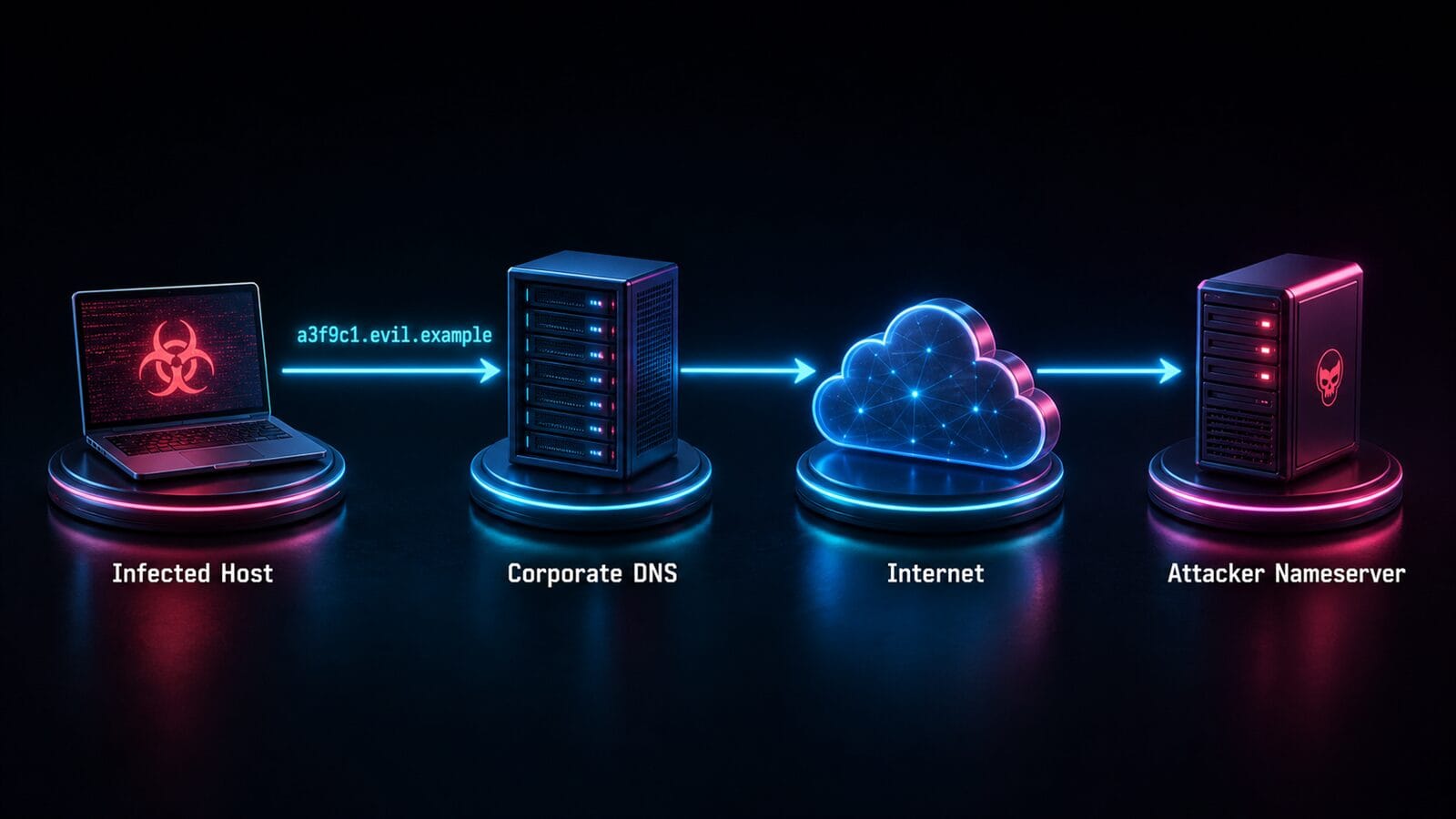
The infected host hands that query to the local DNS server, which does its job and forwards it up the chain until it reaches the attacker’s name server, because that server is authoritative for evil.example. The attacker decodes the subdomain, reads the data, and can reply with more data hidden in the answer record. Repeat that thousands of times and you have a slow, quiet, two-way channel that looks like nothing more than a machine doing a lot of DNS lookups. Palo Alto’s Unit 42 research notes that advanced tunneling malware deliberately spreads its data across many domains to stay under detection thresholds.
The Tools of the Trade
Two open-source tools come up in almost every conversation about this, and both are worth knowing by name because you may see their fingerprints in a packet capture.
iodine tunnels a full IPv4 connection through DNS. Its own documentation describes it as a way to get network access where the internet is firewalled but DNS queries still get through. Point it at a subdomain you control, and it builds a working IP tunnel on top of nothing but DNS lookups.
dnscat2 is built specifically as an encrypted command-and-control channel over DNS. Its author describes it, with some humor, as a DNS tunnel that will not make you sick, and it is designed to give an operator a covert shell out of almost any network. It is a staple of penetration testing for exactly that reason.
Both are legitimate, documented tools. That is the uncomfortable truth of the dark arts: the same technique that lets a traveler beat a hotel captive portal is the one an intruder uses to exfiltrate a customer database. The mechanism does not care about intent.
The Light Side and the Dark Side
Not every DNS tunnel is an attack. Palo Alto Unit 42’s study of tunneling traffic in the wild found people using it to get around censorship, and passengers using it to dodge paid airplane and hotel wifi by riding the free DNS that captive portals leave open. Annoying to a network operator, but not malicious.
The dark side is where it earns the name. DNS tunneling has shown up in serious intrusions as the command-and-control and exfiltration channel. The SUNBURST campaign behind the SolarWinds compromise used DNS for its beaconing, and the OilRig group has leaned on DNS tunneling for years. When a threat actor wants a channel that firewalls ignore and analysts overlook, this is the reach-for tool. It is quiet, it is patient, and it hides in traffic you cannot turn off.
How to Detect It
Here is the part that pays your salary. DNS tunneling is hard to block outright without breaking DNS, so detection is where defenders win. The signals are consistent across tools.
Watch the shape of the queries. Tunneled traffic produces long, high-entropy subdomains, the random-looking strings that encoded data creates, and an unusual number of TXT record lookups. A domain that receives a constant stream of never-repeating subdomains is a classic tell. This is exactly what commercial DNS security engines look for, using n-gram frequency, entropy, and query-rate analysis on each lookup.
Turn on DNS query logging. On Windows endpoints, Sysmon Event ID 22 logs the DNS queries a process makes, which ties suspicious lookups back to the program making them. On Windows Server’s DNS role, analytic logging captures the query stream at the server. You cannot catch what you do not record, and default logging is not enough.
# Pull recent Sysmon DNS query events (Event ID 22)
Get-WinEvent -FilterHashtable @{
  LogName = 'Microsoft-Windows-Sysmon/Operational'
  Id      = 22
} -MaxEvents 200 |
  Select-Object TimeCreated,
    @{n='Query';   e={ $_.Properties[4].Value }},
    @{n='Process'; e={ $_.Properties[6].Value }}
Baseline your volume. A single client suddenly responsible for a huge share of DNS traffic, or making lookups to one domain far more often than any normal service would, is worth a look. Tunneling trades bandwidth for stealth, so the query count climbs even when each query looks small.
When one domain keeps showing up and you want to know what it really is, pull its full record set and network owner before you decide. Our dnsrecon.io lookup tool traces a hostname to its A, AAAA, NS, and TXT records, the ASN that owns the address, and where it sits, which is usually enough to tell a busy content delivery network apart from a domain that has no business receiving a steady stream of odd subdomains.
How to Actually Stop It
Detection tells you it is happening. Stopping it takes a few layers, and a network ad blocker alone is not one of them. A Pi-hole or AdGuard Home will block a known-bad domain if it is on a list, but a fresh attacker domain will not be, and DNS filtering was never designed to inspect the contents of a lookup. It is a good layer, not the answer.
Force all DNS through resolvers you control. Block outbound port 53 to everything except your own DNS servers, so no device can quietly talk to an outside name server directly. This alone kills the direct-connection mode that tools like dnscat2 fall back on.
Inspect, do not simply forward. Put DNS traffic through something that actually analyzes it, whether that is a next-generation firewall with DNS security, a tool like Zeek watching the wire, or a cloud DNS service with tunnel detection built in. The goal is to score queries on entropy and volume, not merely match them against a blocklist.
Alert on the anomalies. Feed your DNS logs into whatever monitoring you already run and alert on the patterns above: long random subdomains, TXT-heavy traffic, and single clients dominating query volume. The technique is quiet, but it is not invisible once you are looking.
That is the honest shape of it. DNS tunneling is a legitimate technique with a criminal second life, it hides in the one protocol you cannot switch off, and the win for defenders is not a magic block button but visibility. Log your DNS, know what normal looks like, and the dark arts get a lot less mysterious.
References
- MITRE ATT&CK T1071.004: DNS Application Layer Protocol
- Palo Alto Unit 42: Understanding DNS Tunneling Traffic in the Wild
- Microsoft Sysmon (DNS query logging, Event ID 22)
- RFC 1035: Domain Names, Implementation and Specification
Related Posts
- Pi-hole: A Black Hole for Ads on Your Network
- 7 Ransomware Groups Targeting Seattle-Area Businesses
- Staying Ahead of AI-Powered Phishing Threats
Worried about what is leaving your network over channels you cannot see? Contact Rain City Techworks.