


New domain. New user account. Empty desktop. All settings gone. Documents in the wrong place.
Domain migrations are painful because Windows creates a fresh profile for the new account. Everything the user had? Still on the drive, but inaccessible.
Profwiz fixes this. It migrates the old profile to the new domain account, preserving everything.
What Is Profwiz?
User Profile Wizard (Profwiz) is a free tool from ForensiT that migrates Windows user profiles between domains. It:
- Joins the PC to a new domain
- Migrates the existing profile to the new account
- Preserves desktop, documents, favorites, app settings
- Updates file permissions automatically
Instead of a blank profile, users log in and everything is exactly where they left it.
When You Need This
- Domain migrations - Moving from old domain to new domain
- M&A activity - Company A acquired Company B, consolidating domains
- Azure AD joins - Moving from on-prem AD to Azure AD
- Local to domain - Converting standalone PCs to domain-joined
- Domain controller replacement - Rebuilding Active Directory
Without Profwiz, each of these means manual profile migration or users starting fresh.
Download
Free Personal Edition: https://www.intechsupport.net/profwiz/
Corporate Edition (paid): https://www.intechsupport.net/profwiz-corporate/
The Personal Edition is free for individual use. Corporate Edition adds mass deployment and scripting features.
How It Works
Before Profwiz
- PC is joined to OLD-DOMAIN
- User logs in as OLD-DOMAIN\john
- Profile lives at C:\Users\john
- All settings, documents, desktop items are there
The Problem
- You join PC to NEW-DOMAIN
- User logs in as NEW-DOMAIN\john
- Windows creates NEW profile at C:\Users\john.NEW-DOMAIN
- Everything is empty
- Old profile still exists but user can't access it
With Profwiz
- Run Profwiz before joining new domain (or after)
- Profwiz migrates OLD-DOMAIN\john profile to NEW-DOMAIN\john
- User logs into new domain
- Everything is there - desktop, documents, app settings
- No lost data, no manual copying
Step-by-Step Guide
Prerequisites
- Admin rights on the PC
- New domain credentials
- Network access to the new domain
Step 1: Run Profwiz
Launch the User Profile Wizard:
Step 2: Select Source Profile
Choose which profile to migrate. Usually the currently logged-in user:
Step 3: Enter New Domain
Specify the new domain and credentials:
- Domain: NEW-DOMAIN (or Azure AD tenant)
- Username: The new account name
- Password: New domain credentials
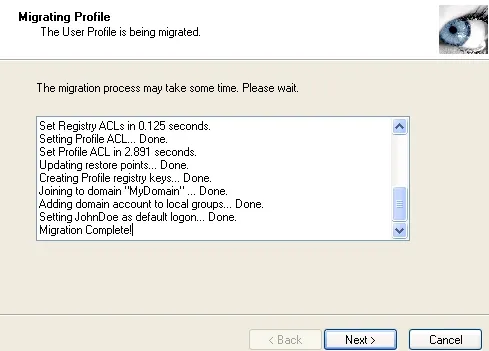
Step 4: Start Migration
Click "Next" - Profwiz:
- Joins the computer to the new domain
- Migrates the profile
- Updates permissions
- Configures the profile for the new account
Step 5: Reboot and Log In
Restart the computer. Log in with new domain credentials.
Everything is there. Desktop, documents, browser favorites, application settings - all preserved.
What Gets Migrated
Migrated:
- Desktop contents and layout
- Documents, Downloads, Pictures, Videos
- Browser favorites and saved passwords (browser-dependent)
- Application settings (AppData)
- Outlook profiles and data
- Mapped drives
- Printer connections
- Most per-user settings
Not Migrated:
- Domain-specific GPO settings (new domain's policies apply)
- Some applications may require reactivation (Office, Adobe)
- Credentials stored in Windows Credential Manager (must re-enter)
Tips for Success
Test First
Run on one machine before mass deployment. Verify everything works as expected.
Backup
Have a backup of user data before migration. Things rarely go wrong, but preparation matters.
Application Reactivation
Some applications check domain membership for licensing. Warn users they may need to:
- Reactivate Microsoft Office
- Re-enter Adobe credentials
- Sign back into cloud apps
Post-Migration Cleanup
The old profile may still exist. After confirming success, you can delete it to reclaim space.
Personal vs Corporate Edition
| Feature | Personal (Free) | Corporate (Paid) |
|---|---|---|
| Single PC migration | Yes | Yes |
| GUI wizard | Yes | Yes |
| Command line | No | Yes |
| Mass deployment | No | Yes |
| Scripting/automation | No | Yes |
| Commercial use | No* | Yes |
*Personal Edition is licensed for personal/evaluation use only.
For MSPs or IT departments doing regular migrations, Corporate Edition is worth it.
Download


Domain migrations don't have to mean lost settings. Profwiz preserves everything.
Need help planning a domain migration? Contact us for a consultation.
Techworks Blog