

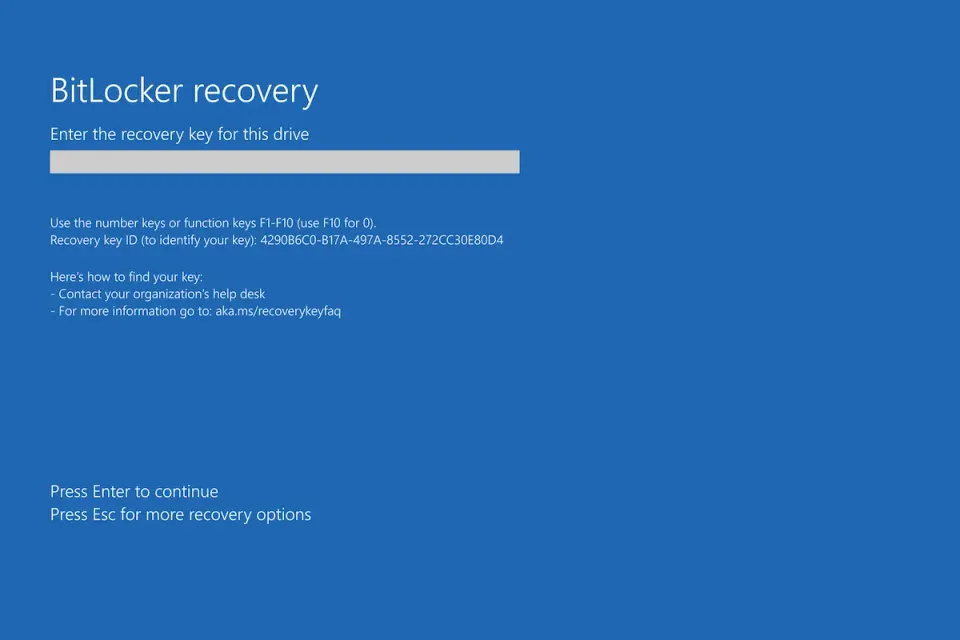
After installing the April 14, 2026 security updates (KB5082063 on Server 2025, KB5083769 and KB5082052 on Windows 11), some devices boot into BitLocker recovery on the next restart. Microsoft confirmed the issue is a one-time prompt triggered by an unrecommended TPM platform validation Group Policy that forces PCR7 into the validation profile.
Affected systems span Windows 11 23H2, 24H2, 25H2, Windows 10, Windows Server 2019, 2022, 23H2, and 2025. The recovery key only needs to be entered once per device, but you want to fix the policy so it does not keep biting you.
Pull Recovery Keys Before You Reboot Anything
If BitLocker is enabled and managed, get your recovery keys queued up before patching. For AD-backed environments:
Get-ADComputer -Filter * -Properties msFVE-RecoveryPassword |
    Where-Object { $_.'msFVE-RecoveryPassword' } |
    Select-Object Name, msFVE-RecoveryPassword
For Entra-joined or Intune-managed devices, grab keys from the Entra portal or the BitLocker recovery keys endpoint in Intune before rolling the patch.
Check If Your GPO Will Trigger the Prompt
Run this on any affected device to see the TPM validation profile:
Get-ItemProperty -Path "HKLM:\SOFTWARE\Policies\Microsoft\FVE" |
    Select-Object PlatformValidationProfile, UEFIPlatformValidationProfile
If UEFIPlatformValidationProfile includes PCR7, and System Information shows Secure Boot State PCR7 Binding: Not Possible, you are set up to hit the recovery prompt.
Confirm PCR7 status:
msinfo32.exe
Look for PCR7 Configuration on the System Summary page.
Fix: Remove PCR7 from the Validation Profile
Microsoft's recommendation is to stop forcing PCR7 on hardware where PCR7 binding is not possible. In Group Policy, open:
Computer Configuration > Administrative Templates > Windows Components > BitLocker Drive Encryption > Operating System Drives > Configure TPM platform validation profile for native UEFI firmware configurations
Set it to Not Configured or uncheck PCR7 (index 7). Then on affected devices:
gpupdate /force
manage-bde -protectors -disable C:
manage-bde -protectors -enable C:
Disabling and re-enabling the protectors rebinds BitLocker to the current TPM state so the next boot does not prompt.
Fix: Apply Known Issue Rollback
If you cannot touch the GPO right now, apply Microsoft's KIR to stop the automatic switch to the 2023 Boot Manager that is triggering the prompt. Import the KIR Group Policy MSI from the Windows release health dashboard and deploy it ahead of the update.
This is a stopgap. The long-term fix is still to remove the unrecommended PCR7 policy.
If a User Is Already Staring at the Recovery Screen
Have them enter the 48-digit recovery key once. After they boot, re-bind BitLocker so it does not happen again:
manage-bde -protectors -disable C: -rebootcount 0
manage-bde -protectors -enable C:
Then roll the GPO fix above so no more machines hit it.
Verify
Confirm BitLocker is healthy and the prompt will not return:
manage-bde -status C:
Expected output: Protection Status: Protection On and Lock Status: Unlocked.
Check the TPM validation profile is sane:
Get-ItemProperty -Path "HKLM:\SOFTWARE\Policies\Microsoft\FVE" -ErrorAction SilentlyContinue
If the key is missing or the UEFIPlatformValidationProfile value no longer includes 7, you are done.
Related Posts
- Fix BitLocker Recovery Key Loop - When the prompt keeps coming back after every reboot
- Export All Drivers Before a Reinstall - Preserve OEM drivers before touching firmware or TPM
- Fix Device Manager Code 10 - Tackle driver faults that surface after a BitLocker reset
Need a plan to audit BitLocker policy across your fleet before the next Patch Tuesday? Contact Rain City Techworks.